
Mastering Your OBD2 Scanner
A Simple Guide to Diagnosing Your Car
Are you tired of seeing your check engine light but having no idea what’s wrong with your car? Owning an OBD2 scanner can save you trips to the mechanic, help you understand your car better, and even improve its performance. No longer reserved for professional mechanics, OBD2 scanners are now affordable and easy to use for car owners.
This guide will help you master your OBD2 scanner, from understanding the device to using it efficiently for diagnostics and maintenance.
Master Your OBD2 Scanner A Simple Guide to Diagnosing Cars
The On-Board Diagnostics II (OBD2) scanner is a powerful tool that pulls error codes and performance data directly from your car’s Engine Control Module (ECM). Introduced in vehicles manufactured after 1996, OBD2 technology is standard in most cars today.
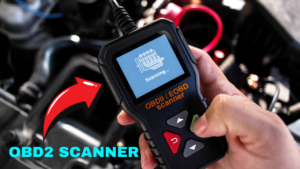
Simply put, the scanner connects to your car’s diagnostic system, retrieves valuable data, and displays it on-screen. This allows you to identify problems, clear error codes, and monitor your vehicle in real-time.
Why Should You Use an OBD2 Scanner?
Save money: Avoid unnecessary trips to the mechanic.
Understand your car: Learn what those error codes mean.
Prevent bigger problems: Diagnose minor issues early.
Improve efficiency: Troubleshoot and optimize performance.
Environmental compliance: Ensure your car meets emissions standards.
How to Use an OBD2 Scanner
Using an OBD2 scanner is straightforward, even for beginners. Just follow these steps to get started.
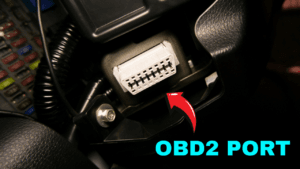
Step 1: Start by Locating the OBD2 Port
Most vehicles have the OBD2 port under the driver’s side dashboard, beneath the steering wheel. Once you’ve found it, plug in the scanner firmly.
Step 2: Power on the Engine
Turn your key to the “on” position or start the car. The ECM needs to be powered for the scanner to communicate with it.
Step 3: Navigate the Scanner Menu
Once the scanner connects to your car, use the menu to explore its features. Most OBD2 scanners will offer options like reading codes, live data, freeze-frame data, and more.
Features to Master on Your OBD2 Scanner
Reading Codes
Stored Codes: These indicate confirmed issues causing the check engine light to illuminate.
Pending Codes: These point to problems the ECM has detected but hasn’t confirmed yet.
If you’ve fixed the underlying issue and want to get rid of the check engine light, simply select “Erase Codes.” However, if the problem persists, the light will come back on.
Live Data Monitoring
Live data lets you view real-time information from your car’s sensors and systems. It’s great for tracking performance metrics and diagnosing intermittent issues. Many scanners also allow you to record data for future reference.
Examples of insights you can gain from live data:
Engine coolant temperature
Fuel efficiency
Oxygen sensor performance
Freeze-Frame Data
When your check engine light turns on, the ECM records a snapshot of the car’s conditions at that exact moment. Freeze-frame data helps you see what was happening when the issue occurred, making it a valuable diagnostic tool.
Inspection and Maintenance Readiness
Planning a smog or emissions test? This feature ensures all emissions control components have passed their self-tests. It’s particularly useful for cars that need to meet stringent environmental regulations.
However, do note that some systems may show “Not Applicable,” depending on your vehicle model.
Onboard Monitor Test
Want more detailed diagnostics? An onboard monitor test allows you to examine up to 13 different systems in detail. For example, if you suspect a misfire, this feature can help pinpoint the exact cylinder causing the issue.
Vehicle Information
Need your VIN or other important details? Many scanners provide easy access to essential vehicle information.
Tips for Choosing the Right OBD2 Scanner
When purchasing an OBD2 scanner, consider the following:
Compatibility: Ensure it works with your car’s make and model.
Features: Look for advanced options like freeze-frame data, live graphing, and multi-language support.
Ease of Use: Opt for a user-friendly interface with clear instructions.
Price-Performance Balance: High-quality scanners like BlueDriver and FIXD offer excellent value for money.
Ensuring Success With Your OBD2 Scanner
To get the most out of your OBD2 scanner:
Keep your car manual handy for reference.
Regularly update the scanner’s software to access new features.
Understand the limitations of your specific scanner model.
Take Charge of Your Car Maintenance
An OBD2 scanner is more than just a diagnostic tool; it’s an empowerment device for car owners. By learning to use it effectively, you can troubleshoot problems, save money on repairs, and keep your car running smoothly.
Before you head to the mechanic, why not give diagnosing the problem a try yourself? Once you get the hang of it, you’ll wonder how you lived without this handy gadget.
Get Started Today
Looking for a reliable OBD2 scanner to kickstart your car maintenance journey? Find our top recommended scanners here.
Happy scanning and safe driving!